

Travel can have many unknowns, which is a part of the thrill and excitement. Will you like the food? Will the people be nice? How will you fit all your souvenirs in your luggage to get them back home?
However, some unknowns veer away from exciting and sprint toward anxiety-inducing. One of the worst of these unknowns is: will your checked luggage make it to the same destination as you?
That wait by the luggage conveyor watching everyone else collect their bags can be a rollercoaster, as you wonder if that hour-long connection in Barcelona really was long enough for your bags to make it to your connecting flight (as you frantically sprinted through the terminal building and regretted booking the bargain flight). Yes, I did that. No, my bag did not make it to London with me.
It turns out that the moment you hand a checked bag over at the airport drop-off counter, you lose control over it. It disappears into the bowels of the airport. A lot of things then happen to your bag, which you have no control or visibility over.
Ok, we can’t give you that control back. But a Bluetooth tracker clipped inside the bag can at least give you some visibility into where your bag is, and some peace of mind. So you can get on with wondering how we can invent an incredible device that flings us across the world in a tiny amount of time, but can’t seem to make the food we serve on board taste like… food.
Sure, it’s not perfect. It probably won’t be in real time. But it will give you the peace of mind that your bag is moving with you as you sit at the layover gate and watch the dot ping in at the new airport before you board your second flight. And if it doesn’t, at least you’ll know where your bag is going on holiday without you. Which is something.
We’ve been a SmartTag household since 2021. Jess and I both use Galaxy phones, we’ve got SmartTags on the suitcases, on the camera bag, on the keys, on the laptop sleeve, and a SmartTag+ on one of the older bags. Four years of clipping these things to luggage we then send underground at Heathrow or onto a baggage cart at Keflavík has shaped what we look for in a tracker for travel. We’re covering the seven trackers worth considering in 2026, organised around the question every traveller actually asks: which one fits my phone.
For the trackers we don’t own (AirTag, Moto Tag 2, Pebblebee, Tile, Chipolo, Eufy, Tracki) the prose below is research-led against manufacturer pages and primary sources. No invented anecdotes about a tracker we’ve never clipped to a bag.
Quick Take: Which Tracker Fits Your Travel Setup
Eight choices is a lot to compare, so this is the buying decision in one table. The rest of the article is the why and the how.
If you read no further: pick the tracker that matches the phone in your pocket. The biggest predictor of whether a tracker will help you find a bag is whether your phone’s ecosystem has the nearest crowdsourced device to it when the bag goes missing.
Why We Wrote This One
We started using Samsung SmartTags in 2021 because we’d already moved the household to Galaxy phones and the SmartThings Find network was the one we could actually use.
The first-generation SmartTag and the SmartTag+ (the UWB version) are still doing their job on the suitcase handles and the side pocket of the camera bag. The SmartTag 2 acquisition is on the next-refresh list rather than in the current household; we’ve written about the v2 based on Samsung’s spec page and on what the upgrade buys you over the v1 we already own. For us, what we have works. A smart tag is supposed to help you track your things, and ours do that. Upgrade not really required.
Where this article talks about clipping a tracker to a checked bag and watching it ping in at the new airport, that’s our SmartTag experience. Where it talks about Apple’s ecosystem or Google’s Find Hub, it’s research-led with primary sources cited, and we flag that within each section.
The buying decision for a checked bag is different from the one for keys or a laptop bag at home. The tracker has to survive a baggage carousel in a country you’ve never been to, last a multi-leg trip with no recharge in your pocket, and ping in fast enough at the layover gate that you’ve still got time to find the airline desk if it doesn’t.
What a Tracker Actually Does at a Layover
Here’s the realistic version. You clip a Bluetooth tracker inside the bag. You drop the bag at the airline counter. The tracker isn’t broadcasting to a satellite (that’s a different product, covered below as Tracki Pro). It’s broadcasting Bluetooth to whatever phones happen to be near it, and those phones (anonymously, encrypted) relay the location back to your phone via the manufacturer’s network.
What that means at an airport: while the bag is at the gate or on the airfield, there are hundreds of phones around. The location updates fairly fast. While the bag is in the cargo hold during the flight itself, there’s basically nothing, and you’ll see the dot stay where you last left it. As soon as the bag is being unloaded at the destination, the location updates again. Same thing if the bag transits through a layover airport: the tracker doesn’t go quiet, it just goes still for as long as it’s airborne, then refreshes as soon as it’s near phones.
The useful moment is the gate-to-gate check at the layover. You land at, say, Barcelona for a connection onwards. You sit down at the gate. You open SmartThings Find (or Apple Find My, or Google Find Hub, depending on your tracker). You watch for the dot to come back from wherever the bag was last seen. The dot pings in, ideally at the same airport you’re sitting in. If it pings in at a baggage cart, or at the destination airport while you’re still at the layover, that’s the conversation you want to have with the airline before you board the next leg, not after you’ve landed and the carousel is empty.
That use case is what shapes the rest of this guide. Battery life matters more than it does on a key fob because the tracker has to last a multi-leg trip with no recharge in your pocket. Water resistance matters because checked bags get rained on. Crowdsourced network size matters because at 3am in a foreign airport you want the closest phone to your bag to be one that recognises the tracker.
The Comparison Table
The table below is the full spec block. Every value is verified against the manufacturer’s own current product page. Where a cell is blank it’s because the manufacturer doesn’t publish that number on its page.
| Product | Network | Battery | Battery Life | Wireless | Range | IP Rating | Weight | Dimensions | Price (USD) |
|---|---|---|---|---|---|---|---|---|---|
| Samsung Galaxy SmartTag 2 | SmartThings Find (Samsung Galaxy only, Android 11+) | CR2032, user-replaceable | Up to 500 days; 40% longer in Power Saving Mode | Bluetooth 5.3 + UWB | Up to 120 m (394 ft) | IP67 | 13.75 g | 28.8 × 52.44 × 8.0 mm | $29.99 |
| Apple AirTag (2nd gen) | Apple Find My | CR2032, user-replaceable | Over 1 year | Bluetooth + 2nd-generation Ultra Wideband chip | Precision Finding up to 50% farther than 1st gen | IP67 | 11.8 g | 31.9 mm dia × 8.0 mm | $29 single / $99 four-pack |
| Motorola Moto Tag 2 | Google Find Hub | CR2032, user-replaceable | Over 600 days | Bluetooth 6.0 + UWB | Not stated | IP68 | Not stated | Not stated | ~$30 per unit in 4-pack |
| Pebblebee Clip 5 | Apple Find My OR Google Find Hub (switchable, one at a time) | Rechargeable, USB-C | Up to 12-18 months | Bluetooth (no UWB) | Up to 150 m (500 ft) | IPX6 | ~8 g | ~45 × 38 × 8.5 mm | $34.99 |
| Pebblebee Card 5 | Apple Find My OR Google Find Hub (switchable, one at a time) | Rechargeable, USB-C | Up to 12-18 months | Bluetooth (no UWB) | Not stated | Not stated | Not stated | Not stated | $34.99 |
| Tile Pro | Tile network (Life360-owned) | CR2032, user-replaceable | Up to 1 year | Bluetooth | Up to 150 m (500 ft) | IP68 | Not stated | Not stated | $34.99 |
| Chipolo CARD Spot | Apple Find My | Non-replaceable | Up to 2 years | Bluetooth | Up to 60 m (200 ft) | IPX5 | Not stated | 85.1 × 53.6 × 2.4 mm | $35 |
| Tracki Pro GPS | 4G LTE + 3G/2G fallback + Wi-Fi + GPS (subscription required) | Rechargeable 10,000 mAh Li-ion | 2 to 12 months per charge | Cellular + GPS | Global (cellular coverage dependent) | Not stated | 263 g | 89.9 × 63.0 × 37.1 mm | $35.86 hardware + $9.95/mo subscription |
The cells we couldn’t fill from manufacturer pages (Moto Tag 2 weight and dimensions, Tile Pro weight and dimensions, Chipolo CARD Spot weight, most of the Card 5 spec column) are blank rather than guessed.
The Seven Picks
The order below is roughly by household-fit, not by ranking. None of these are bad trackers; the question is which one matches your phone and your trip. For most people the choice will be relatively simple, and will depend on what type of smartphone you’re using.
Samsung Galaxy SmartTag 2: The Samsung-Household Pick
Samsung released the SmartTag 2 on 11 October 2023 at $29.99 and it’s still Samsung’s only shipping tracker. We run the prior-generation SmartTag and SmartTag+ on the suitcases rather than the v2, so what we can say from direct use is that the SmartThings Find network on Galaxy phones works the way you’d want it to at every UK and European airport we’ve passed through, the CR2032 batteries last comfortably between annual swaps, and the form factor clips cleanly inside a zippered pocket or onto a luggage tag loop.
What the v2 adds over the v1 we use: a Power Saving Mode that extends the headline 500-day battery life by about 40% (so closer to 700 days in the conservative mode), Bluetooth 5.3, IP67 rating (the v1 was IP53), and a 120 m Bluetooth range claim. The form factor changed too; the v2 has the lanyard loop built in rather than needing a case, which is the single thing we’d value most if we were buying it new today.
The non-negotiable caveat is the same one Samsung has had since the SmartTag launched: this tracker only works with Samsung Galaxy phones running Android 11 or newer. If anyone in your household is on a Pixel, a OnePlus, or an iPhone, they can’t help locate the tracker, and the network they reach is only the Galaxy device closest to your bag at any moment.
Samsung’s most recent published milestone (May 2023, via SamMobile citing Samsung) was over 300 million Galaxy devices in the SmartThings Find network, which is enough density at any major airport but worth knowing about if you’re heading somewhere with a lower Samsung market share.
In our experience it’s worked everywhere we’ve tried it. Samsung is the largest single Android OEM globally, and most Samsung phones from the last few years are part of the network.
The price is $29.99 in the US and £35 in the UK. Check the current price on Amazon.
Apple AirTag (2nd Generation): The iPhone-Household Pick
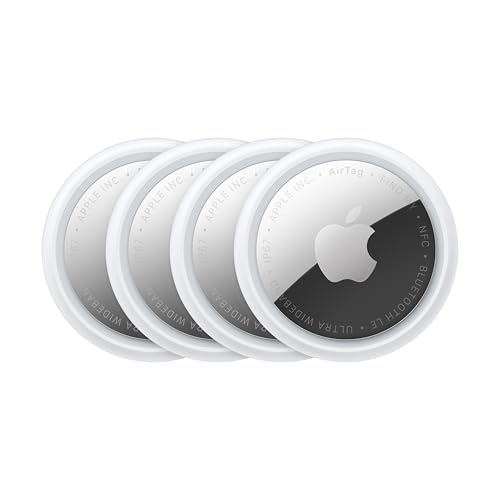
Apple announced the second-generation AirTag on 26 January 2026 alongside the iPhone 17 family and made it available to order the same day. The price stayed at $29 single and $99 for a four-pack, and Apple has delisted the first-generation AirTag from apple.com (third-party retailers still have stock of the older model at a discount, though).
The v2 upgrade is the second-generation Ultra Wideband chip (the same chip that ships in iPhone 17, iPhone Air, Apple Watch Ultra 3, and Apple Watch Series 11), and the Precision Finding feature now works from up to 50 percent farther away than it did on the v1. Apple doesn’t publish a Bluetooth-range figure or a device-count for the Find My network; the network is described as a crowdsourced network of Apple devices that use Bluetooth technology, without a specific number attached.
For an iPhone household with even one Mac or iPad in the mix, this is the buy. The Find My network is dense in every region we’ve travelled in, the IP67 rating is fine for checked-bag conditions, and the four-pack pricing is what makes it worth tagging the suitcase, the camera bag, and the laptop sleeve all at once. The weight is 11.8 g, the device is 31.9 mm across and 8 mm thick, and the CR2032 battery is user-replaceable and rated for over a year.
The one limitation worth flagging is the form factor. An AirTag is a disc; it doesn’t have a built-in keyring hole. You’ll want a loop or a case to clip it to a bag handle, which adds a couple of pounds to the per-tag cost. Check the current four-pack price on Amazon.
If you’re specifically after a wallet-slim Apple Find My option (no keyring loop, fits in a card slot), the Eufy SmartTrack Card and SmartTrack Card E30 are worth a look alongside the Chipolo CARD Spot lower down this list. All three are Apple Find My only; Eufy’s E30 is the rechargeable variant with the louder alarm.
Motorola Moto Tag 2: The Non-Samsung Android Pick

Motorola announced the Moto Tag 2 at CES in January 2026 and started shipping it in mid-May 2026 in the US (via Amazon third-party, since Motorola doesn’t currently run a US storefront page for it), in the UK at £29.99, and in Germany at €40. The 4-pack ends up around $119.99 on Amazon, so per-unit pricing is roughly $30.
This is the buy if you have a Pixel, a OnePlus, a Nothing Phone, or any non-Samsung Android phone and you want a tracker built around that ecosystem.
The Moto Tag 2 broadcasts on the Google Find Hub network (formerly Google Find My Device, rebranded May 2025 at the Android Show I/O Edition). The Find Hub network covers over 1 billion Android devices globally per Google’s marketing, which makes it the densest Bluetooth-tracker network in absolute terms.
Worth correcting a common misconception: the Moto Tag is NOT a cross-network tracker. It works with Google Find Hub only. The cross-platform feature it does support is anti-stalking alerts that work between Android and iOS (so an iPhone can warn its owner that an unknown Moto Tag is travelling with them), but the tracker itself doesn’t register location pings on Apple’s Find My network. If you want a single tracker that switches between Apple and Google networks, that’s Pebblebee’s territory, not Motorola’s.
The hardware specs are competitive. Bluetooth 6.0 (the first tracker shipping with the new spec), UWB for Precision Finding on supported phones, IP68 water resistance (one step better than the SmartTag 2’s IP67), and a CR2032 user-replaceable battery rated at over 600 days by Motorola’s press materials. The EMEA product page itself says over 500 days rather than 600, which is the same battery with different conservatism settings; either way it’s a fit-and-forget battery life for travel use.
The current limitation is regional availability. Motorola hasn’t put up a US product page yet and the US 4-pack listings on Amazon are third-party rather than direct Motorola. That’s likely to resolve over the next few months. Check current availability on Amazon.
Pebblebee Clip 5 and Card 5: The Mixed-Ecosystem Pick

Pebblebee’s current shipping range (Clip 5 plus Card 5, both at $34.99) is the only one on this list that switches between Apple Find My and Google Find Hub. The earlier Tag Universal has been retired in favour of the Clip 5; the “5” generation is the rename plus refresh of the older “Universal” line. The switches word is doing a lot of work there, so to be precise: each tracker can be paired with one network at a time, and to swap networks you reset and re-pair the tracker through Pebblebee’s app. It’s not simultaneous dual broadcast; it’s a one-step manual switch when you want to move the tracker between ecosystems.
The household-fit this serves is one we’d otherwise have nothing for: a couple where one partner uses an iPhone and the other uses an Android phone, and one of them does most of the international travel with the checked bag. The traveller pairs the Pebblebee to whichever network their own phone uses. If the trip later involves the other partner picking up the bag at a destination airport, the tracker can be re-paired to the other network for that leg. It’s the only product where this is a single-purchase answer rather than a buy-two-different-trackers answer.
Two form factors are worth knowing about. The Clip 5 is the keyring-style tracker (about 8 g, USB-C rechargeable, 12-18 months between charges, Bluetooth range up to 150 m, IPX6 rated). The Card 5 is the wallet-slim card-form version at the same $34.99, with the same network switching, the same USB-C rechargeable battery, and the same 12-18 month battery-life claim. Neither has UWB, so Precision Finding within a room isn’t part of the package. Card 5 weight, dimensions and IP rating aren’t published on Pebblebee’s current product page, so we’ve left those cells blank in the comparison table above.
The trade-off vs the ecosystem-native trackers (SmartTag 2, AirTag, Moto Tag 2) breaks down like this. You get cross-network flexibility, you lose UWB, and you take a hit on the maximum specs in either network. For a single household device that has to flex between iPhone and Android users, the trade is worth making. For a single-ecosystem household, buy the native tracker. Check the Clip 5 and Card 5 bundle on Amazon.
Tile Pro: The Life360-Household Pick

Life360 announced its acquisition of Tile on 22 November 2021 (the $205M deal closed in Q1 2022), and Tile still ships under Life360 ownership in 2026. The Tile Pro is the flagship, priced at $34.99, with a user-replaceable CR2032, IP68 water resistance, and up to 150 m of Bluetooth range. Battery life is rated at up to a year.
The reason to buy Tile over an ecosystem-native tracker is essentially Life360 integration. If your family already runs Life360 for child or teen location-sharing, Tile Pros plug into the same app you’re already using, and the tracker’s location pings show up alongside everyone’s phones in the family map. The friction of running yet another app (SmartThings Find for Galaxy, Find My for Apple, Find Hub for Android) goes away.
The reason to think twice is the network. Tile’s network is separate from Apple Find My and Google Find Hub, and it’s smaller than either. Tile’s published network figures haven’t been updated meaningfully since the Life360 acquisition, and what’s documented suggests the active node count is well below the hundreds of millions of Galaxy devices on SmartThings Find or the billion-plus Android devices on Find Hub. In a major international airport you’ll likely get pings; in a smaller regional airport you might wait longer. If Life360 integration isn’t a draw for your household specifically, one of the native-network trackers is the safer pick.
One detail not on the manufacturer page: Tile doesn’t publish weight or dimensions on its current Life360-hosted product pages, so we’ve left those cells blank in the comparison table above. Check the current Life 360 Tile Pro price on Amazon.
Chipolo CARD Spot: The Wallet-Slim Apple Find My Pick

The CARD Spot is shaped exactly like a credit card. 85.1 mm long by 53.6 mm wide and 2.4 mm thick (slightly thicker than a typical bank card but thinner than the cardholder section of most travel wallets), it slips into a card slot in a passport wallet or the cash pocket of a money belt. It runs on Apple Find My, costs $35, and the non-replaceable battery is rated at up to two years. Bluetooth range to play sound is 60 m (200 ft).
The big warning: this is a wallet tracker, not a checked-bag tracker. The IP rating is IPX5 (splash-resistant), which means it’ll survive a rainstorm in your back pocket but it isn’t rated for submersion the way the IP67 and IP68 trackers higher up this list are. Checked bags do sometimes get rained on at length on baggage carts, and a wet pocket inside a soft-sided suitcase is a different test from sliding the card out of a wallet that briefly caught the rain. If you want a tracker for a checked bag specifically, pick one of the IP67 or IP68 disc-style trackers. The CARD Spot is the tracker for the wallet you’re carrying as cabin baggage.
The household-fit is iPhone households who want a tracker in the passport wallet alongside the SmartTag or AirTag on the bag. The Apple Find My network does the work; the card form factor is what makes it worth the cabinet space. Check the CARD Spot on Amazon.
Tracki Pro GPS: Real-Time Cellular Tracking

The Tracki Pro is a different category. The six trackers above are Bluetooth-only and rely on a crowdsourced network of other people’s phones to relay locations. Tracki Pro has its own SIM, broadcasts on 4G LTE (with 3G/2G fallback and Wi-Fi), and includes its own GPS receiver. The location updates are real-time and they work without any phones nearby. The trade-off is the subscription: hardware costs $35.86 on tracki.com (Tracki runs frequent promotions so the price can vary), and the monthly plan starts at $9.95.
The use case where this is the right buy: international trips into regions where Bluetooth network density is unreliable. Remote stretches of the South American interior, big chunks of Africa outside major cities, parts of central Asia, deep rural Europe. For typical city-to-city travel within Europe, North America, East Asia, Australia, the Bluetooth trackers do the job and you’re paying for the subscription you don’t need.
The hardware is a different shape too. 263 g, 89.9 mm by 63 mm by 37.1 mm, rechargeable 10,000 mAh Li-ion battery that lasts 2 to 12 months per charge depending on update frequency. The page describes it as waterproof but doesn’t publish an IP number, so we’d treat it as splash-tolerant rather than submersion-rated and use a dry bag if it’s heading somewhere wet.
The straight read on the subscription: the hardware is cheap to lock you in. Long-term cost is the monthly plan. If you’d use it for one trip in five, the subscription is worth pausing between trips (Tracki supports this). If you’d use it monthly, the maths is easy. If you’d use it twice a year and then forget you have it, the subscription will outweigh the hardware in a couple of months. Check Tracki Pro on Amazon for the hardware; subscriptions are managed on tracki.com.
What to Buy When Your Household Mixes iPhone and Android
The answer requires picking a single product that does two jobs. Pebblebee’s Clip 5 and Card 5 are the only trackers on the market built for this case. Reset-and-repair switching between Apple Find My and Google Find Hub is the mechanism; one purchase covers both ecosystems, and either partner can be the primary locator depending on who happens to have the bag.
If switching isn’t acceptable (you want both partners actively tracking the bag at the same time on their respective phones), the answer changes: buy two trackers, one for each ecosystem, and clip both to the bag. A SmartTag 2 plus an AirTag is roughly $60, lasts longer than either tracker alone (because if one battery dies mid-trip the other still works), and gives both partners full-network access to the bag from their own phone. The hardware cost is the same as a four-pack of either, which is what most travel households would buy anyway.
The third answer is to designate one partner as the locator. Whoever flies more often, has the bag-checking responsibility, or just prefers the app interface their tracker uses, that’s the household lead. They buy the tracker that matches their own phone (SmartTag 2 for Samsung, AirTag for iPhone, Moto Tag 2 for any other Android). The other partner doesn’t track the bag from their phone, but they don’t lose anything they had before. This is what we do: I’m the SmartThings Find user, Jess can ask me where the bag is rather than checking herself. It works because the network only needs one phone to do the looking, and that phone is mine.
Airline Policy: Tracker Integration, Not Bans
The current state of airline policy on Bluetooth trackers is the opposite of where the conversation started in late 2022. Lufthansa Group (Lufthansa, SWISS, Austrian, Brussels, Eurowings) actively integrates Apple Find My location-sharing into its baggage-tracing systems. When a bag gets misrouted, Lufthansa’s tracing team can request the passenger share an AirTag’s location with them, then use that to pinpoint where the bag actually is and route it back. The Lufthansa Group newsroom announcement is the primary source.
This is the practical answer to “are airlines still trying to ban these?” No. The October 2022 Lufthansa statement that briefly flagged AirTags as banned (and which reversed three days later, after the Luftfahrtbundesamt confirmed the trackers posed no safety risk) is the moment that policy peaked in the wrong direction. The reversal was the news, and the subsequent integration into baggage tracing is where airlines have actually landed. Other carriers have followed the same template; the trackers help airline ops staff find lost bags, so airlines have no operational reason to fight them.
IATA’s July 2023 whitepaper, “Leveraging Personal Bluetooth Trackers for Enhanced Baggage Tracking,” is the industry-framework document. It acknowledges the operational reality (passengers will use trackers; airlines should integrate with that) without issuing a clean “trackers are permitted” ruling. That permission comes from national civil-aviation authorities. In the US, the FAA’s PackSafe rule for lithium-metal batteries permits installed CR2032 coin cells in checked baggage (the 2 g lithium-content limit per battery is the relevant rule; a CR2032 contains about 0.1 g, well under). Spare loose lithium cells are carry-on only, which matters if you pack a spare battery for the tracker rather than leaving the installed one to last the trip.
The summary that actually helps you at the check-in counter: yes, you can put a tracker in checked baggage in 2026, the airline’s ground staff probably appreciates that you have one, and if anything goes wrong the tracker is the fastest path to getting the bag back to you.
How Many Trackers Per Bag
One is enough for a single-ecosystem household. The tracker you buy needs to match the phone you carry, and a current-generation tracker on a UWB-capable phone (SmartTag 2 needs a Galaxy with UWB, which covers most flagships from the Note 20 Ultra and S21+ onwards plus the Fold/Flip line; AirTag Precision Finding works back to the iPhone 11, and the longer-range Precision Finding on the AirTag 2nd gen rewards an iPhone 15 Pro or later with the second-generation UWB chip) is the setup that does the job.
Doubling up makes sense in two cases. The first is mixed-ecosystem households, covered above: a SmartTag 2 plus an AirTag, or a Moto Tag 2 plus an AirTag, gives both partners full-network access to the bag. The second is multi-bag travel: if you check more than one bag, the four-pack pricing on AirTags and the bulk pricing on most other trackers makes the per-tag cost negligible, and tagging each bag separately is more useful than tagging one and hoping the others stay together. Camera bags, laptop sleeves, and child car seats checked at the gate are all worth their own tracker if you’re already buying in bulk.
The doubling-up case that’s overrated is “redundancy in case one tracker fails.” Trackers don’t fail mid-trip in any pattern we’ve seen across four years of use, and the CR2032-based ones have multi-year battery life. If you want belt-and-braces, you’d be better served pairing a Bluetooth tracker (cheap, multi-year battery) with a cellular GPS tracker like the Tracki Pro (real-time, no crowdsourced dependency) for one bag, rather than two Bluetooth trackers in the same bag on the same network.
What to Do When the Tracker Says the Bag Didn’t Board
This is the scenario that matters. You’re at the layover gate, the bag is supposed to be in transit, and SmartThings Find (or Find My, or Find Hub) shows the dot at the wrong place. There are three versions of “the wrong place” worth distinguishing.
First version: the dot is at the previous airport’s baggage hall, not the connection airport. This is the bag-didn’t-make-the-transfer case. The action: find the airline’s gate agent or transfer desk before you board the next leg. Show them the tracker location, name the previous airport, give them the airline reference. Most major carriers’ ground staff will have seen this conversation before, and showing them the location pin shortcuts the “we’ll trace it at your destination” answer to “we can route it on the next flight.” If the airline can’t reroute it on your flight, the tracker still tells you where it is overnight, which is the difference between sleeping and not sleeping at the layover hotel.
Second version: the dot hasn’t updated for hours and the last known location is mid-route (airfield or in-flight). This is usually not a problem. Cargo holds have very few phones nearby, the bag is in flight, and the next update will come when the bag is unloaded at the destination. The mistake to avoid here is panicking at a stationary dot during the flight itself. Wait until you’ve landed and the carousel has started before treating this as a problem.
Third version: the dot is at the destination but on the wrong carousel, the wrong terminal, or off-airport entirely. This is the post-arrival case. If you’re still at the carousel, walk the tracker map to the dot’s location; it might be at a neighbouring carousel for a delayed unload. If the dot is off-airport, it’s been taken by someone else (rare) or moved by airline ground staff to a holding area (more common). In either case, the airline’s baggage office is the next stop. The location data is what you bring to that conversation.
The reassurance you actually want at the layover gate is the boring version of all of this. Most of the time the dot does ping in at the right airport, you board your next flight without any of the above, and the only thing the tracker did was prove the bag was where it should be. That’s the useful function. The “didn’t board” decision tree is the insurance, not the everyday case.
FAQ
Do I Need an International Roaming Plan for the Tracker to Work Abroad?
Not for any of the Bluetooth-based trackers in this guide. They broadcast Bluetooth locally to whatever phones are nearby; the phones relay the location through their own data connection (the owner’s, not yours). Your tracker doesn’t connect to a network itself, so it has nothing to roam.
The Tracki Pro GPS is the exception, because it has its own SIM and broadcasts on 4G LTE. Tracki’s subscription covers international roaming by default on the standard plans, so you’re already paying for global coverage if you’re subscribed. Confirm the plan tier before relying on it in a specific country.
Are Airlines Still Banning AirTags in Checked Baggage?
No. Lufthansa’s brief October 2022 statement was reversed within three days, and Lufthansa Group has since gone further and integrated AirTag location-sharing directly into its baggage-tracing systems. Other major carriers have followed the same path. The current operational position across the industry is that trackers help find lost bags, not hinder safety.
The FAA’s lithium-battery rule still applies: a CR2032-style coin cell installed in the tracker is permitted in checked baggage (well under the 2 g lithium-content limit per battery). Spare loose batteries belong in carry-on. If you pack a backup CR2032 in case the tracker dies mid-trip, keep it in your hand luggage.
Is One Tracker per Bag Enough?
For most travellers, yes. A current-generation tracker on the right network for your phone gives you the location data you actually need at a layover or on arrival. The case for two trackers in one bag is specific: mixed-ecosystem households where both partners want network access, or pairing a Bluetooth tracker with a Tracki Pro for redundancy on a high-stakes trip into a low-network-density region.
The case for “one tracker per bag, multiple bags” is stronger than the case for “two trackers in the same bag.” If you check more than one bag, tag each one separately rather than doubling up.
What If My Phone and My Partner’s Phone Are Different Ecosystems?
You have three options. Buy a Pebblebee Clip 5 or Card 5 and switch which network it’s paired to depending on who has the bag (single purchase, network-switching). Buy two ecosystem-native trackers (a SmartTag 2 and an AirTag, for instance) and clip both to the bag so both partners can locate it from their own phone (about $60, full-network access for both). Or designate one partner as the household locator and only run their ecosystem’s tracker.
For most mixed households the second option (buy both) is the least friction. Hardware cost is roughly the same as a four-pack of either tracker.
What If the Tracker Says the Bag Is at a Different Airport?
The action depends on where you are. If you’re at the layover and the dot is still at the previous airport, find the airline’s transfer desk before boarding the next leg. The tracker location speeds up the “where is my bag” conversation considerably. If you’re at your destination and the dot is at a previous airport, the airline’s baggage office is the right stop, and showing them the location pin gets you a routing answer faster than the standard “we’ll trace it” process.
The thing to avoid is panicking at a stationary dot mid-flight. Cargo holds have very few phones nearby; the dot won’t update again until the bag is unloaded.
Can I Pack the Coin-Cell Battery in Checked Baggage?
If it’s installed in the tracker, yes. The FAA permits lithium-metal coin cells in checked baggage as long as they’re installed in a device and the battery contains under 2 g of lithium content. A CR2032 is about 0.1 g of lithium content, well under the limit.
Spare loose lithium-metal batteries (a backup CR2032 in a small bag, for example) are carry-on only under FAA rules. The same rule applies for international flights operating to or from the US, and most non-US national civil-aviation authorities have equivalent restrictions in line with ICAO guidance.
